Dollar Pay Stub · Permanent $1 price

A clean pay stub PDF for $1.

Create one straightforward Simple Wide pay stub without buying a larger template package. Enter the employer, employee and pay details, review the live document before checkout, then download the clean PDF after payment is verified.

  • Preview before checkout
  • Server-set $1 price
  • Clean PDF after verified payment
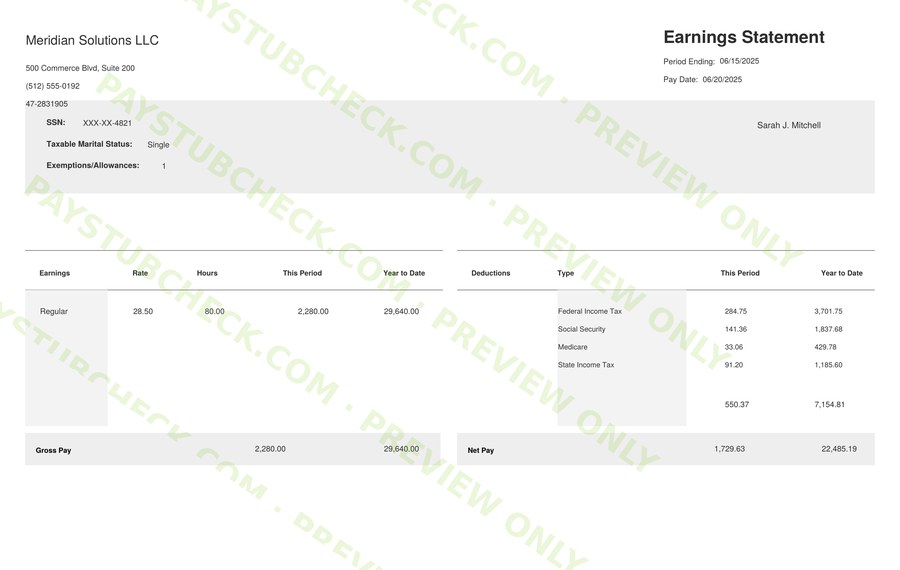
Simple Wide pay stub layout included with Dollar Pay Stub
$1per document
Simple WideOne layout · clean final PDF

What you get

One focused pay stub product, without extra tiers built into the checkout.

Dollar Pay Stub is intentionally simple: one document, one fixed Simple Wide layout and a permanent $1 price. The information you enter is used to calculate and display the pay period details before you decide whether to continue to checkout.

01

Live document preview

Review employer details, employee details, earnings, deductions and calculated totals in the Simple Wide layout before paying.

02

Permanent $1 price

The Dollar product price is $1 per document. The checkout amount is set on the server rather than accepted from a browser-submitted price.

03

Clean final PDF

The unwatermarked final PDF is generated only after the associated Stripe Checkout Session is verified as paid.

How it works

From pay details to a finished PDF in three clear steps.

Dollar Pay Stub keeps the workflow compact while still giving you a chance to review the document before payment.

1

Enter the pay information

Add the company and employee information, pay period dates, earnings, deductions and other fields shown by the generator.

2

Review the preview

Check names, dates, figures and calculated totals in the live Simple Wide preview. Correct anything that needs attention before checkout.

3

Complete secure checkout

Continue to Stripe Checkout for the $1 payment. The clean PDF becomes available only after PayStubCheck verifies the paid session.

Designed to stay straightforward

A fixed layout for users who do not need a larger design package.

Dollar is a distinct product rather than a discounted version of another paid tier. It uses the Simple Wide presentation and keeps the available options deliberately narrow.

Included with Dollar

  • One Simple Wide pay stub layout
  • Employer and employee information fields
  • Pay-period earnings, deductions and calculated totals
  • Live preview before checkout
  • One clean, unwatermarked PDF after verified payment
  • Existing paid-delivery behavior provided by the shared U.S. fulfillment flow

Intentionally not included

  • No template picker or multiple-layout bundle
  • No color-selection interface
  • No logo upload
  • No browser-controlled pricing
  • No clean final PDF before payment verification
  • No claim that the generated document verifies income or employment
Review your information before using the document.

PayStubCheck generates a document from the information entered into the tool. It does not independently verify employment, income or the accuracy of user-supplied details, and it does not provide payroll, legal, tax, accounting or financial advice.

Review before checkout

See the document first, then decide whether to complete the $1 purchase.

The generator is built around a live preview so you can inspect the visible document before opening Stripe Checkout. That review step is especially useful for catching spelling, date and amount-entry mistakes before the final paid PDF is produced.

The checkout price remains fixed at $1 on the server. Changing a displayed value in the browser does not change the amount used to create the Stripe Checkout Session.

Before you continue

  • Confirm employer and employee names are spelled correctly.
  • Check the pay-period and pay-date fields.
  • Review earnings, deductions, taxes and net pay.
  • Use the preview to catch entry errors before checkout.
  • Continue only when the document reflects the information you intend to provide.

Questions before you start

Dollar Pay Stub FAQs

How much does the Dollar Pay Stub cost?

The price is $1 per document. This is not a first-document or introductory offer; $1 is the permanent Dollar Pay Stub price.

Can I preview the pay stub before paying?

Yes. Enter the required information and review the live Simple Wide preview before continuing to Stripe Checkout.

What happens after I pay?

PayStubCheck verifies the Stripe Checkout Session. Once the session is confirmed as paid, the clean, unwatermarked final PDF can be generated and downloaded.

Can the browser change the $1 checkout price?

No. The Dollar checkout amount is defined on the server. Browser-displayed prices are not trusted as the source of the Stripe amount.

Does Dollar include multiple templates, colors or logo upload?

No. Dollar intentionally uses one Simple Wide layout and one fixed presentation, without a template picker, color selector or logo-upload feature.

Does the generated pay stub verify my income or employment?

No. PayStubCheck is a document-generation service. It does not independently verify employment, income or user-entered information.

Ready to create your $1 pay stub?

Open the Dollar generator, enter the pay details, review the Simple Wide preview and continue to secure checkout when the document is ready.

Open the $1 generator →